 Free Shipping on US orders above $49






What You Need to Know
What Is This Cable and What Does It Do?
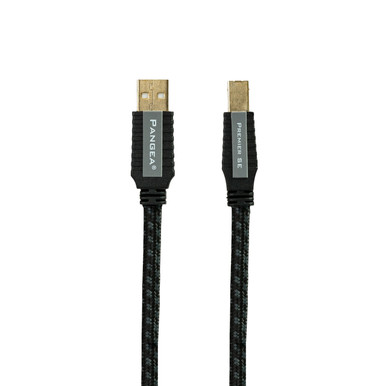
The Premier SE MkII is a USB audio cable. One end is a standard USB Type A plug — the flat rectangular connector you'll recognize from computers, laptops, and most USB wall chargers. The other end is a USB Type B plug, the squarish connector used on most standalone DACs, CD and Blu-ray players, and some streaming devices. Together, they form the digital link between the device that stores or plays your music and the converter that turns those digital bits into the analog signal your amplifier can use.
In most systems, this cable connects a computer or streamer to an external DAC. That DAC is often the most sonically important component in a digital audio chain — and the USB connection feeding it carries digital audio data, often at high resolution (up to 32-bit / 384 kHz PCM or DSD, depending on your DAC's capabilities).
The Premier SE MkII sits at the top of Pangea Audio's USB cable lineup. The "SE" designation indicates Signature Edition — Pangea's term for cables built with upgraded conductor materials and more elaborate construction than their standard offerings.
What's Different About This One?
A USB cable carries four conductors inside a single jacket: two for power (a positive and a ground) and two for data (a differential pair that transmits the digital signal). In a generic cable, all four conductors share the same shielded space. In the Premier SE MkII, according to Pangea Audio, the power conductors and the data conductors are independently shielded from each other.
Why does that matter? The power conductors in any active USB cable carry noise — electrical hash generated by the connected devices. When power and data share the same shield without separation, that noise can couple into the data pair. Independent shielding creates a barrier between them, keeping the power-line noise away from the conductors carrying your audio data.
The data conductors themselves use silver-plated copper wire. Silver-plating — a thin layer of silver applied to the outside of each copper strand — takes advantage of a characteristic called the skin effect. Silver has slightly lower electrical resistance than copper at those surface layers, which is why silver or silver-plated conductors are commonly used in cables designed for high-frequency digital signals.
The connectors on both ends are housed in metal casings rather than plastic. Metal housings improve mechanical rigidity at the connection point and reduce the chance of the connector flexing or wiggling against the port — a common source of intermittent connections on budget cables over time.
The result, according to Pangea Audio, is a USB cable designed specifically for the requirements of USB audio — not a repurposed general-purpose data cable.
Where Does This Cable Belong in Your System?
The Premier SE MkII connects any USB Type A source to any USB Type B device. In audio use, the most common applications are: a computer or laptop running audio playback software (Roon, Audirvana, JRiver, or even a plain media player) to a standalone DAC; a dedicated network streamer or music server with a USB output to a DAC; and a CD player or Blu-ray player that uses USB as its digital audio output.
It also works for USB-connected disc players and music servers with USB Type B inputs. If you're not sure which USB connector your DAC or player uses, the device end is almost always Type B on standalone audio components — check the manual or the back panel labeling.
The cable is available in lengths ranging from 0.5 m to 5.0 m. As a general principle, use the shortest length that works comfortably in your installation. Shorter cable runs mean a more direct path for the signal and less surface area for airborne interference to couple into the cable along its length. If your DAC is on the same shelf as your computer or streamer, a 0.5 m or 1.0 m cable is almost always the right answer. Longer runs — 3.0 m or 5.0 m — make sense when the source device and the DAC are physically separated in a room.
Note: USB audio operates in asynchronous or adaptive modes depending on your DAC. In asynchronous mode — used by most quality standalone DACs — the DAC controls the data clock rather than the computer, which reduces jitter regardless of the source device. A well-made cable supports this reliably; a cable with marginal connectors or poor shielding can introduce noise that affects DAC performance even in asynchronous mode.
Features & Specifications
Conductors
The Premier SE MkII uses silver-plated copper wire for its data conductors. Silver-plating applies a thin layer of silver to the surface of each copper strand — the layer through which high-frequency signals primarily travel due to the skin effect. The power conductors are standard copper. According to Pangea Audio, the data and power conductor groups are independently shielded from each other within the cable to prevent power-line noise from coupling into the data path.
Shielding
Independent shielding separates the two differential data conductors from the two power conductors. This is a more elaborate approach than a single overall shield, which is what most generic USB cables use. The goal is to prevent electrical noise carried on the USB power conductors from entering the data pair. The overall cable also includes outer shielding against external RFI (Radio Frequency Interference) and EMI (Electromagnetic Interference).
Connectors
USB Type A (source end: computer, streamer, music server) and USB Type B (device end: DAC, disc player, headphone amp with USB input). Both connectors are housed in metal casings, which improve mechanical rigidity and long-term connection integrity compared to plastic-housed connectors. Contact surfaces are gold-plated to resist oxidation over time.
Jacket
The cable uses a flexible woven outer jacket. The overall cable is designed to be easy to route in equipment racks and around audio furniture without stiffness or stress on the connector joints.
Available Lengths
0.5 m (about 1.6 ft) / 1.0 m (about 3.3 ft) / 1.5 m (about 5 ft) / 3.0 m (about 10 ft) / 5.0 m (about 16.5 ft)
Quick-Reference Specifications
| Cable Type | USB audio cable — Type A to Type B |
| Data Conductors | Silver-plated copper, differential pair |
| Power Conductors | Copper; independently shielded from data pair |
| Shielding | Independent shielding for data and power; outer shield for RFI/EMI rejection |
| Connectors | USB Type A (source end) / USB Type B (device end); gold-plated contacts; metal housings |
| Jacket | Woven outer jacket; flexible |
| Available Lengths | 0.5 m / 1.0 m / 1.5 m / 3.0 m / 5.0 m |
| Designed For | Computers, streamers, and disc players connected to USB DACs, headphone amps, and USB audio devices |
Pairs Well With
Building your system around a digital source? Here are some natural companions for the Premier SE MkII.
- DACs & Digital-to-Analog Converters — The primary destination for this cable. A USB DAC is the single most common use case for USB audio cables. Browse DACs at Audio Advisor.
- Streamers & Network Players — Many network streamers include a USB output for connecting to a separate DAC. Browse Streamers & Network Players.
- CD Players & Disc Players — Some CD and Blu-ray players include a USB Type B input or output for digital audio connections. Browse CD Players at Audio Advisor.
- Headphone Amplifiers with USB DAC inputs — A growing number of headphone amplifiers include built-in USB DAC circuits, making the Premier SE MkII a direct connection from computer to headphone amp. Browse Headphone Amplifiers at Audio Advisor.
- Pangea Audio AC-14XL MkII Power Cable — If you're upgrading the connection to your DAC, it's logical to also upgrade the DAC's power cable. The AC-14XL MkII is Pangea's flagship source-component power cable. See the full Pangea Audio line.
- Pangea Audio AC-14SE MkII Power Cable — Another excellent Pangea source-component power cable option, with a unique conductor geometry featuring a solid Cardas Grade One Copper center strand. See the full Pangea Audio line.
- Power Conditioners — A good power conditioner cleans up the AC power feeding your DAC and streamer — a complementary approach to cable-level noise management. Browse Power Conditioners at Audio Advisor.
Frequently Asked Questions
My DAC already works fine with the cable that came with it. Why would I consider an upgrade?
Many DACs ship without a USB cable, and those that do include one typically supply a generic, unshielded cable built to a low cost. The Premier SE MkII uses silver-plated data conductors, independent shielding between the data and power pairs, metal connector housings, and gold-plated contacts — construction that is objectively more robust than a generic cable. Whether you'll notice a difference in practice depends on your system and electrical environment. If your current setup has any USB-related noise issues — dropouts, interference, or instability — a better-built cable is a logical first step.
What's the difference between a USB Type A and USB Type B connector?
USB Type A is the flat, rectangular plug you see on one end of virtually every USB cable. It connects to the host device — your computer, laptop, streamer, or music server. USB Type B is the squarish, slightly trapezoidal plug on the other end — the type found on most standalone DACs, CD players with USB inputs, and USB audio interfaces. The Premier SE MkII is a standard USB A-to-B cable, which is the most common configuration for connecting an audio source to a DAC or player.
Does it matter what length USB cable I use for audio?
Within the USB 2.0 specification, cables up to 5 meters (about 16.5 feet) are supported for full-speed and high-speed operation — which covers all standard USB audio applications including hi-res PCM and DSD. The Premier SE MkII is available up to 5.0 m, staying within that specification. As a practical matter, use the shortest length that fits comfortably between your source and your DAC: less cable length means less surface area for airborne interference to couple into the conductor. If your source and DAC are on the same shelf, a 0.5 m or 1.0 m cable is usually the best choice.
What does "asynchronous USB" mean, and does the cable choice affect it?
Asynchronous USB is a mode used by most quality standalone DACs in which the DAC controls the timing of data requests rather than the computer. This greatly reduces jitter — timing errors in the digital signal — because the DAC's own clock governs when data arrives, rather than the computer's less precise USB clock. A good-quality cable supports asynchronous operation reliably; a cable with poor contacts or marginal shielding can introduce noise that affects the DAC's performance even in async mode. The Premier SE MkII is built to handle this correctly.
What is silver-plating, and why use it on a USB cable?
Silver-plating means applying a thin layer of silver to the surface of each copper conductor strand. Since silver has slightly lower electrical resistance than copper at those surface layers, silver-plated conductors can reduce resistance in high-frequency signal paths. USB audio carries digital data at high frequencies, which is why Pangea Audio uses silver-plated copper for the data conductors in the Premier SE MkII.
Why does independent shielding for the power pair matter?
USB cables carry both data and power on the same connector. The power conductors can pick up electrical noise from connected devices and, without separation, that noise can couple into the data conductors running alongside them. The Premier SE MkII independently shields the power and data conductor groups from each other inside the cable — creating a barrier between them. This is a more involved construction than a single overall outer shield, and Pangea Audio presents it as a key reason the Premier SE MkII is better suited to audio applications than a generic cable.
Will this cable work with my DAC that uses a USB Mini-B or Micro-B connector?
The Premier SE MkII is a standard USB Type A to USB Type B cable. It will not physically fit a Mini-B or Micro-B port without an adapter. Some older or portable DACs and headphone amps use Mini-B or Micro-B connections — check the back panel of your device or its manual before ordering. If you're unsure, give us a call at 800-942-0220 and we'll help you figure out the right fit.
Why Audio Advisor?
 40+ Years of Expertise — Since 1981, we’ve helped over a million music lovers find the right gear.
 60-Day Money-Back Guarantee — Take your time. Listen, enjoy, and make sure it’s right for you.
 Real Experts, Real Help — Our team is here to answer your questions at 800-942-0220, weekdays 9am–6pm EST.
 Free Shipping — On orders over $49, delivered to your door.
 Flexible Payment Options — Financing available so you can start listening now.


