 Free Shipping on US orders above $49




What You Need to Know
What This Cable Is — and What It Isn't
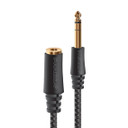
This cable is an extension. One end has a 3.5mm male plug — the small, round plug you know from headphones and earbuds. The other end has a 3.5mm female socket. Plug the male end into your source. Then plug your headphone cable into the female socket. You get more reach without replacing anything.
This is not a replacement headphone cable. It doesn't plug into your headphones in place of the factory cable. It just makes the connection between your source and your headphones longer. Need to replace a headphone cable instead? Give us a call and we'll point you in the right direction.
This is the right cable when your headphones can't quite reach your source. Think of a headphone amp on a desk, a receiver in a cabinet, a DAC/amp on a shelf, or a laptop across the room. One cable, more freedom to move.
Why the Cable You Use Here Actually Matters
Any connector you add to a signal chain is a chance for noise to get in or for something to wear out. A cheap extension cable with thin wire and basic metal contacts is a weak link between you and your music. The connector joints are usually the first thing to fail.
The Premier is Pangea Audio's answer to doing this right. The conductors are shielded [verify material from spec sheet] to keep interference out. The connectors on both ends use gold-plated contacts. Gold doesn't corrode the way other metals do — and that matters for a connector that gets plugged and unplugged often.
Both connector housings — the male plug and the female socket — are metal rather than plastic. Metal housings hold the joint firm. They keep the wire inside from flexing loose when the cable gets moved or tugged.
None of this is fancy engineering. It's just doing a simple cable the right way.
Where This Cable Belongs in Your System
This cable works with any headphones that use a standard 3.5mm plug. That's the most common headphone plug in the world, used on most consumer and audiophile headphones. If your headphone cable ends in a 3.5mm plug, this extension will work with it.
You might use it to reach a headphone amp on your desk, to add length from a receiver in a cabinet, or to stretch from a DAC/amp on a shelf to your listening chair. Any time your headphone cable comes up short, this cable fills the gap.
If your source has a 6.35mm (1/4-inch) headphone jack — common on most dedicated headphone amps and receivers — this cable won't fit without an adapter. [Verify whether a 6.35mm version of this cable is available at Audio Advisor.] Not sure what your amp has? Call us at 800-942-0220 before you order.
Use the shortest length that fits your setup. Shorter cables pick up less interference and keep the signal path direct. For a desktop setup, 1.0 m to 2.0 m is usually enough. For a living room system, longer may work better. [Verify available lengths from the Audio Advisor backend.]
Features & Specifications
Conductors
The cable carries your stereo audio signal — left channel, right channel, and ground — through shielded conductors inside a flexible jacket. [Verify conductor material from the Pangea Audio spec sheet before publishing, e.g., silver-plated copper or OFC copper.] The shielding keeps interference from nearby electronics out of the signal.
Shielding
Headphone cables carry a quiet analog signal. That makes them easy for nearby interference to affect. Things like phones, wireless routers, LED lights, and switching power supplies can all add noise. Shielding wraps the conductors in a barrier that blocks that interference before it enters the signal path.
Connectors
The male end is a 3.5mm TRS plug. TRS stands for Tip-Ring-Sleeve — the three parts of a standard stereo audio plug. It goes into your source. The female end is a 3.5mm TRS socket, and your headphone cable plugs into it.
Both connectors use gold-plated contacts. Gold resists corrosion, so the connection stays clean even with regular use. Both housings are metal, which keeps the joints inside from working loose when the cable moves.
Jacket
The jacket is flexible. It lies flat on a desk and moves with you without adding drag to your headphones.
Quick-Reference Specifications
| Cable Type | 3.5mm stereo headphone extension — male to female |
| Connector Format | 3.5mm TRS (Tip-Ring-Sleeve) stereo; male plug (source end) to female socket (headphone end) |
| Conductor Material | [Verify from spec sheet — e.g., silver-plated copper or OFC copper] |
| Shielding | Shielded; RFI/EMI rejection [verify shielding type from spec sheet] |
| Contact Plating | Gold-plated contacts on both male and female connectors [verify] |
| Connector Housings | Metal housings on both ends [verify] |
| Jacket | Flexible outer jacket [verify material from product page] |
| Designed For | Extending any 3.5mm stereo headphone cable from a fixed source: headphone amplifiers, DAC/amps, integrated amplifiers, receivers, computers, and portable players |
Pairs Well With
Adding length to your headphone setup? Here are some components this cable pairs naturally with.
- Headphone Amplifiers — The most common use case. If your amp is on a desk or shelf and your headphone cable falls short, this extension bridges the gap. Browse Headphone Amplifiers at Audio Advisor.
- DAC/Amp Combinations — Compact DAC/amp units are popular on desks and bedside tables; an extension adds comfortable reach without moving the unit. Browse DACs & DAC/Amps at Audio Advisor.
- Stereo Receivers & Integrated Amplifiers — Many receivers have a front-panel headphone output. If the amp is in a cabinet or rack, an extension lets you listen from the couch. Browse Receivers at Audio Advisor and Integrated Amplifiers at Audio Advisor.
- Headphones — Works with virtually any headphones that use a standard 3.5mm cable. Browse Headphones at Audio Advisor.
- Pangea Audio Premier SE MkII USB Cable — If you're also connecting a computer to a DAC/amp, Pangea's Premier SE MkII USB is a natural companion upgrade. See the full Pangea Audio line.
- Portable DACs & Dongles — If you use a portable USB or Lightning DAC with a laptop or phone, an extension adds comfortable reach on your desk. Browse DACs at Audio Advisor.
Frequently Asked Questions
What's the difference between a headphone extension cable and a headphone replacement cable?
An extension cable makes your headphone connection longer. The male plug goes into your source. Your headphone cable plugs into the female socket on the other end. A replacement cable is different — it plugs directly into your headphones and swaps out the factory cable. The Premier is an extension only. It does not replace your headphone cable.
Will plugging in an extension cable affect my sound?
Adding any cable adds a small amount of resistance and one more connector joint. In theory, that can affect the signal. In practice, a well-built, shielded extension at a normal length is very unlikely to change what you hear.
The bigger risk is a cheap, unshielded cable. It can pick up noise from nearby electronics, corrode at the contacts, or lose signal at a loose joint. The Premier is built to avoid all of that.
How long a cable do I need?
Measure the distance from your source to where you sit or stand. Add a little slack so the cable isn't pulled tight. Then pick the shortest length that works without any tension on the connector.
For a desktop setup, 1.0 m to 2.0 m is usually enough. For a living room system where you sit farther from the amp, 3.0 m or longer may be the better fit. [Verify available lengths before publishing.]
My headphone amp has a 6.35mm (1/4-inch) output, not 3.5mm. Will this cable work?
This cable uses 3.5mm connectors on both ends. Most dedicated headphone amps and stereo receivers have a 6.35mm (1/4-inch) output — a larger plug that won't fit this cable directly. You'd need an adapter or a different cable. Call us at 800-942-0220 and we'll help you find the right fit.
How does this compare to a generic extension cable from a big-box store?
A generic extension is usually unshielded, uses thin wire, and has basic metal contacts in a plastic housing. The Premier uses shielded conductors, gold-plated contacts, and metal housings on both ends.
We can't promise you'll hear a difference — that depends on your system. But the build is objectively better, and it's more likely to hold up over years of daily use.
Will this work with my headphones?
The Premier works with any headphones that use a standard 3.5mm stereo plug. That covers most consumer and audiophile headphones.
It won't fit without an adapter if your headphones use a 6.35mm plug, or if they use a balanced connector like 2.5mm or 4.4mm pentaconn. Not sure what yours uses? Check the plug end of the cable, or give us a call and we'll confirm.
What do "TRS" and "stereo" mean on this connector?
TRS stands for Tip-Ring-Sleeve — the three sections on a 3.5mm audio plug. The tip carries the left channel. The ring carries the right. The sleeve is the shared ground. That's the standard layout for all stereo headphone plugs.
The Premier uses TRS on both ends, so it carries a full stereo signal the whole way through — correct for headphone use.
Why Audio Advisor?
 40+ Years of Expertise — Since 1981, we’ve helped over a million music lovers find the right gear.
 60-Day Money-Back Guarantee — Take your time. Listen, enjoy, and make sure it’s right for you.
 Real Experts, Real Help — Our team is here to answer your questions at 800-942-0220, weekdays 9am–6pm EST.
 Free Shipping — On orders over $49, delivered to your door.
 Flexible Payment Options — Financing available so you can start listening now.
Want to learn more about headphone cables and headphone amps? Visit our Learning Center for plain-English guides and expert advice on getting the most from your headphones.


